
Imagine you've built an AI assistant. It's good at planning, and now you want it to actually do things — look up an order, book a room, run a database query.
Somewhere out there is a system that can do each of those. So your assistant needs to answer one question first:
"What can you do, and how do I ask you to do it?"
Right now, there is no shared answer. Every company, framework, and toolkit has invented its own. That's the problem the Agent Discovery Specification — ADS — is trying to fix.
This guide explains what it is, why it's designed the way it is, and walks you through building a working example on your own machine. No prior experience with writing standards required.
What you'll get out of this
- Why connecting AI agents to tools is harder than it looks
- What a "capability manifest" is, explained field by field
- A hands-on tutorial you can run in about 10 minutes
- How to make your first contribution to an open standard
Table of contents
- The problem: everyone speaks a different language
- The idea: put a menu at the front door
- Jargon decoder
- Building a manifest, piece by piece
- How a client finds the manifest
- Three ideas that make it work
- How is this different from MCP or OpenAPI?
- Try it yourself
- Making your first contribution
- Things that could be improved
- FAQ
The problem: everyone speaks a different language
Think about what happened before USB.
Every device had its own cable. Your printer had one plug, your camera another, your mouse a third. If you owned five devices and three computers, you needed a drawer full of adapters. Adding one new device meant checking whether it worked with everything you already owned.
USB fixed that with one boring idea: agree on the plug shape. After that, any device works with any computer. You went from "every pair needs its own cable" to "everyone follows one rule."
AI agents are in the pre-USB era right now.
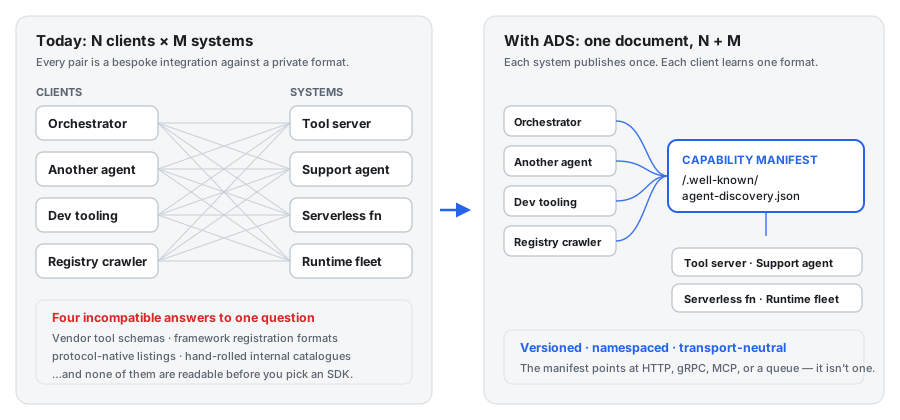
On the left, four AI clients want to talk to four systems. Because every system describes itself differently, that's sixteen separate integrations to write and maintain. Add one more system and you write four more.
On the right, every system publishes the same kind of document. Now each system writes one description, each client learns one format, and adding a new system costs nothing for everyone else.
That's the difference between N × M and N + M. At small numbers it doesn't matter. At real numbers it's the whole ballgame.
The part that makes it worse
Here's the detail that turns an annoyance into a real barrier.
Most existing ways to ask "what can you do?" only work after you've already committed. You install their library, open a connection, log in — and then you can ask what's available.
It's like having to buy a plane ticket before you're allowed to see where the plane is going.
What you actually want is to ask the question first, cheaply, from the outside.
The idea: put a menu at the front door
ADS solves this with one small idea, borrowed from something you already use every day.
When you visit a restaurant, you don't have to sit down, order, and eat before finding out what they serve. The menu is by the door. You read it, decide, and only then commit.
ADS says: every agent-addressable system should put a menu at a fixed, predictable address.
https://example.com/.well-known/agent-discovery.json
That's it. That's the core of the whole specification.
Any client — another AI agent, a developer's tooling, a search crawler — can fetch that one URL and learn what the system can do. No login. No SDK. No connection. Just a normal web request that returns a normal JSON file.
Why /.well-known/?
That funny-looking path isn't made up. It's a long-standing web convention (defined in RFC 8615) that reserves a folder on every website for machine-readable metadata.
You've been benefiting from it for years without noticing:
| Path | What it's for |
|---|---|
/.well-known/security.txt |
How to report a security bug to this site |
/.well-known/openid-configuration |
How to log in with this identity provider |
/.well-known/assetlinks.json |
Which mobile app is allowed to open these links |
/.well-known/agent-discovery.json |
What this system can do, for AI agents |
The value is that the location is known in advance. You don't have to search, ask, or read documentation. If you know the domain, you know where to look.
What ADS deliberately does not do
This is the part people miss, and it's what makes the spec small enough to actually finish.
ADS tells you a capability exists, what it needs, and where to send the request. Then it stops.
Back to the restaurant: the menu tells you the dish exists, what's in it, and roughly what to expect. It does not cook. It does not tell the kitchen how to cook. Cooking is somebody else's job entirely.
So ADS is:
- ❌ Not a way of calling things. It points at an address; whatever lives at that address defines its own request and response format.
- ❌ Not a login system. It tells you a capability needs an API key. It doesn't tell you how to get one.
- ❌ Not tied to any AI model or framework. It doesn't care whether a capability is powered by a large language model, an ordinary function, or a human being reading emails.
- ❌ Not an app store. It tells you how to read one system's menu, not how to browse a directory of thousands.
The spec sums up its own scope in one sentence, and it's worth memorising:
ADS answers "what exists and how do I start," not "how do I finish."
Jargon decoder
Specifications are full of words that mean something precise. Here's what you need, in plain language. Skip ahead and come back if you'd rather learn them in context.
| Term | Plain English |
|---|---|
| Manifest | A description of something, written for machines to read. Here: the "menu" JSON file. |
| Capability | One specific thing a system can do. lookupOrder is a capability. |
| Client | Whatever is reading the manifest — another agent, a script, a crawler. |
| Endpoint | The address you send a request to, plus how to reach it. |
| Transport | How you talk to something: normal web requests (http), a specific agent protocol (mcp), a message queue, and so on. |
| Schema | A description of what a valid document looks like, so a computer can check it automatically instead of you eyeballing it. |
| SemVer | Version numbers shaped 1.4.2. First number = breaking change, second = new stuff added, third = small fixes. |
| MUST / SHOULD / MAY | Standards-speak. MUST = hard rule, breaking it means you're not following the spec. SHOULD = strongly recommended, deviate only with a good reason. MAY = entirely optional. |
| Namespace | A prefix that stops two people accidentally picking the same name. com.example.lookupOrder is namespaced; lookupOrder isn't. |
| Deprecated | Still works, but it's on the way out. Start migrating. |
That's genuinely most of the vocabulary. Standards look intimidating mostly because of the words, not the ideas.
Building a manifest, piece by piece
Let's build one from nothing. We'll pretend we run an online shop and we want AI agents to be able to look up orders.
Step 1: the absolute minimum
Five fields. That's a legal, complete manifest:
{
  "specVersion": "0.1.0",
  "id": "com.example.minimal",
  "name": "Minimal Example",
  "provider": { "name": "Example Inc." },
  "capabilities": []
}
Reading that top to bottom:
specVersion— which version of the ADS rules this file follows. A client reads this first to check it understands the format at all.id— a permanent, unique name for this system. Think of it like a username: it identifies you, and you never change it or hand it to someone else.name— the human-friendly label. This one's for people, not machines.provider— who runs this system.capabilities— the list of things it can do. Here it's empty, which is allowed. A shop that's temporarily offering nothing is more honest than a broken page.
Why is
idsuch a big deal? It's how a client tells "same system, updated menu" from "completely different system." If you reuse anidfor something else, every client that trusted it is now silently wrong. The spec treats that as unforgivable no matter what version number you bump.
Step 2: add something it can actually do
An empty menu isn't much use. Let's add a capability:
{
  "name": "com.example.lookupOrder",
  "version": "1.2.0",
  "description": "Look up an order by id and return its current status.",
  "inputSchema": {
    "type": "object",
    "properties": { "orderId": { "type": "string" } },
    "required": ["orderId"]
  },
  "endpoint": {
    "transport": "http",
    "address": "https://api.example.com/v1/orders/lookup",
    "auth": "apiKey"
  }
}
Why the long name? com.example.lookupOrder looks clunky compared to just
lookupOrder. But imagine two companies both define lookupOrder and they mean
different things. Now a client can't tell them apart.
The fix is the same trick Java packages and Android app IDs use: start with a domain
you own, backwards. If you control example.com, then everything under
com.example.* is yours automatically. Nobody has to approve it, and nobody can
collide with you without taking your domain first.
Why does the capability have its own version number? Because the thing it does can change independently of the format of the file. More on that shortly — it's one of the smartest ideas in the spec.
What's inputSchema? A machine-readable description of what you're allowed to
send. Here it says: send an object, it needs a field called orderId, and that field
must be text. A client can validate its request before sending it, and tooling can
generate a form or a function signature from it automatically.
Step 3: the endpoint block
This is the part that actually tells a client where to go:
"endpoint": {
  "transport": "http",
  "address": "https://api.example.com/v1/orders/lookup",
  "auth": "apiKey"
}
transport— how to talk to it. Common values:http,grpc,mcp,queue.address— where. A URL for web requests; something else for other transports.auth— what kind of credentials you'll need:none,apiKey,oauth2, ormtls.
Two design choices here are worth pausing on, because they're the kind of thing you'd only think of after being burned.
First: those lists are open, not fixed. If someone invents a new transport tomorrow, they can just use it. Clients that don't recognise it skip that capability; everything else keeps working. Compare that to a fixed list, where adding one value means a new version of the whole specification and everyone upgrading.
Second: auth is required. You cannot leave it out. A capability with no
authentication has to explicitly say "auth": "none".
That second one seems fussy until you think about it. If auth were optional, then a
missing field would be ambiguous — does this need no credentials, or did someone
forget to fill it in? By forcing you to say "none" out loud, "this is open to the
world" becomes a deliberate statement someone has to write down, rather than
something you accidentally imply. That's a small rule that prevents a real class of
security mistake.
The finished picture
Here's everything assembled, with each part labelled:
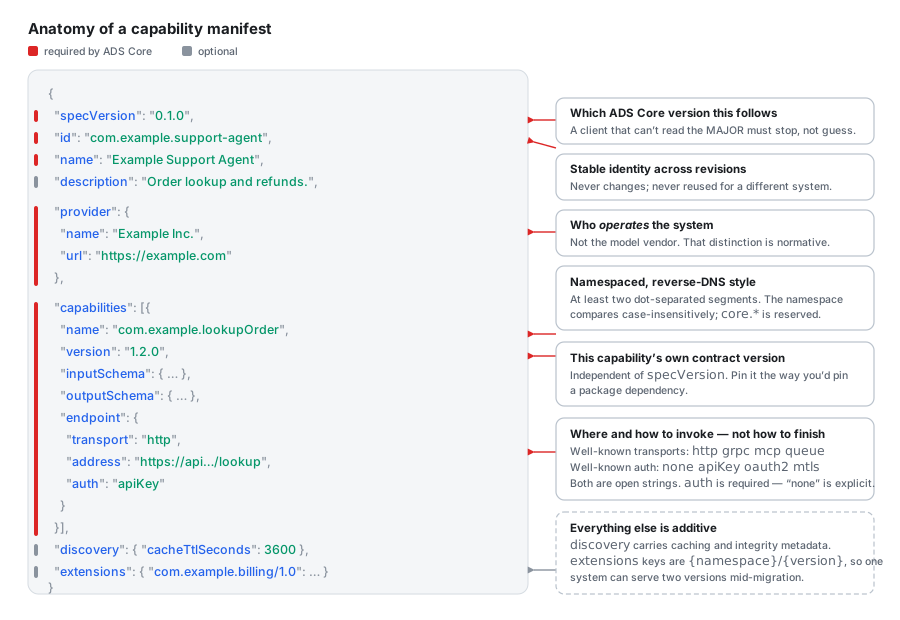
Red marks along the left edge show which fields are required. Everything else is optional.
The two optional blocks at the bottom are worth a quick mention:
discovery— housekeeping about the file itself. MainlycacheTtlSeconds: "you can safely reuse this for an hour before checking again."extensions— a sandbox for anything the standard doesn't cover. Want to advertise your rate limits or pricing tier? Put it here under your own namespace. No permission needed, and clients that don't recognise it will ignore it safely.
How a client finds the manifest
There are three ways to locate a manifest, depending on what you're starting with.
1. The normal way — a web request. You know the domain, so you fetch the well-known path:
curl https://example.com/.well-known/agent-discovery.json
Every system reachable over the web must support this one. It's the baseline.
2. Via DNS — for when you want to know before opening any connection:
_agent-discovery.example.com. IN TXT "ads=https://example.com/.well-known/agent-discovery.json"
This is a DNS record that just says "the menu is over there." It's a signpost, not the menu itself — DNS records are too small to hold a whole document.
3. As a local file — for things with no web address at all. A command-line tool or
a library can ship an agent-discovery.json file in its project folder. Same format,
no server involved.
What the client does with it
Once fetched, the client runs through a fixed sequence:
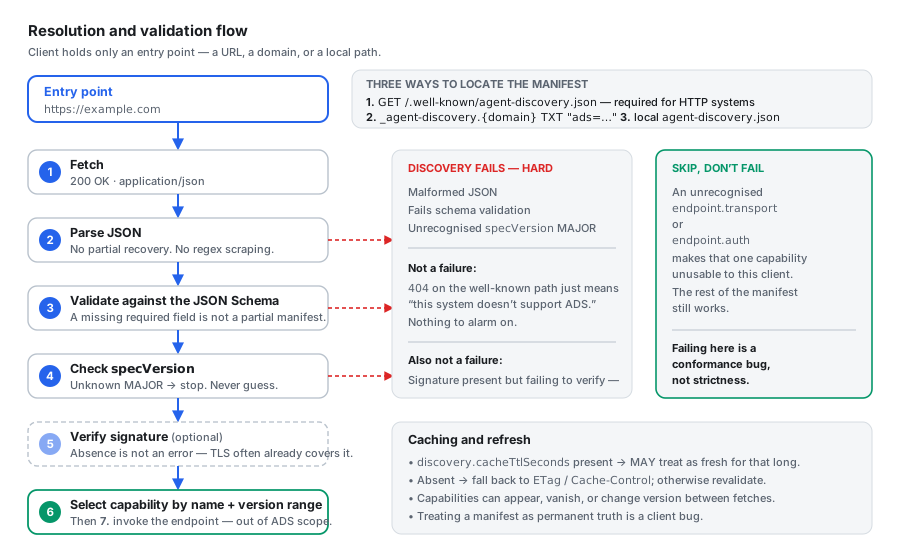
- Fetch the file.
- Parse it as JSON. If it's malformed, stop — don't try to salvage fields with clever string matching.
- Validate it against the schema. Missing a required field means it isn't a manifest, not that it's a partial one.
- Check the version. If the first number is higher than anything you understand, stop and say so clearly.
- Check the signature — optional, only matters if you don't trust how you got the file.
- Pick the capability you want by name and version.
- Call it — and at this point ADS is done and out of the way.
The bit that trips people up
Look at the two coloured boxes on the right of that diagram. They describe two very different kinds of failure, and the difference matters enormously.
Stop completely if the document is broken. Malformed JSON, missing required fields, a version you can't read — these are all "I cannot trust anything here."
Just skip it if something is merely unfamiliar. If one capability uses a transport you've never heard of, that's not a broken file. It's one item on the menu you can't order. Skip it and use the rest.
That second rule is so important the spec makes it a hard requirement, and calls failing here "a conformance bug, not strictness." A client that rejects the whole manifest because of one unfamiliar word is broken — even though it feels like it's being careful.
And one more, worth internalising: a 404 is not an error. If there's no file at
the well-known path, that system simply doesn't support ADS. Nothing has gone wrong.
Don't log a scary warning.
Three ideas that make it work
Strip away the details and ADS rests on three decisions. These are the transferable part — they're worth knowing even if you never touch this particular spec.
Idea 1: ignore what you don't understand
A client must not reject a manifest just because it contains something it doesn't recognise. It ignores what it doesn't understand and uses what it does.
This sounds obvious. It is not how most software behaves.
The usual instinct when parsing a file is to be strict: unknown field, throw an error. That feels safe. But in a system where different parties upgrade at different times, strictness is fatal — the moment anyone adds anything, everyone else breaks.
Being deliberately tolerant is what lets the standard grow without a flag day where the whole world upgrades at once. It's the same reason your browser doesn't white-screen when a site uses a CSS property it hasn't implemented yet.
Idea 2: three separate version numbers
Here's a trap almost every young standard falls into: using one version number for everything. ADS keeps three, and refuses to mix them.
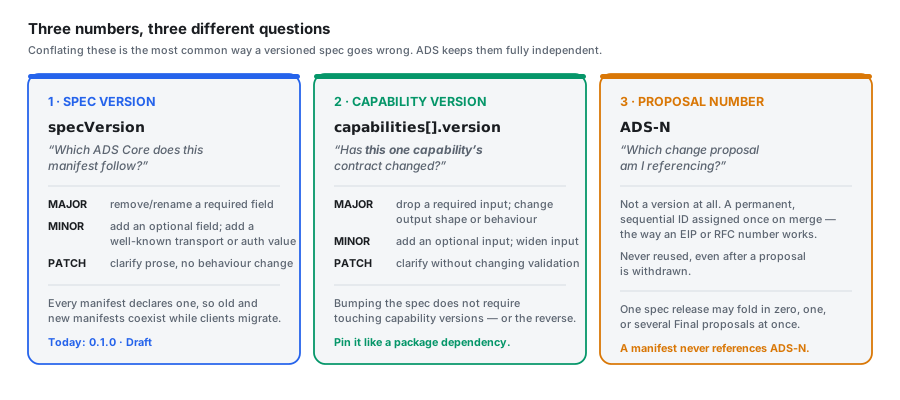
| Number | Answers | Example |
|---|---|---|
specVersion |
Which version of the rules does this file follow? | 0.1.0 |
capabilities[].version |
Has this one capability changed how it behaves? | 1.2.0 |
ADS-N |
Which proposal document are we discussing? | ADS-0 |
Why does this matter? Picture the alternative.
You fix a typo in the specification. Under a single-version scheme, that's a new version — so does every system now have to re-publish? Separately, you change what one capability returns. Different question entirely, but the same number would have to carry both meanings.
By splitting them, each number answers exactly one question and never lies. The third
one isn't even a version — ADS-0 is a permanent ID for a proposal, like a ticket
number. It never increases and never gets reused.
The practical takeaway for you as a client: treat a capability's version like a package dependency. Pin the range you tested against. If the first number jumps, assume you need to re-check your integration — don't assume it'll still work.
Idea 3: deprecate, don't delete
When a capability is going away, you don't just remove it. You mark it:
{
  "name": "com.example.legacyCancelOrder",
  "version": "1.0.0",
  "deprecated": true,
  "deprecatedSince": "1.0.0",
  "removalNotBefore": "2.0.0",
  "endpoint": { "transport": "http", "address": "…", "auth": "apiKey" }
}
The rules around this are stricter than most projects bother with, and all three are good:
- A deprecated capability must keep working. Deprecation is a warning, not a slow-down or a stealth removal. The spec calls quietly returning errors from a "deprecated" capability a violation.
- You must announce it before removing it. There has to be a real gap between "we told you" and "it's gone."
- You should give calendar time too, not just version numbers — six months is the suggested default. Version numbers and real time don't move together, and a project that ships fast could otherwise burn through a "deprecation window" in a fortnight.
If you've ever had a dependency vanish under you without warning, you'll recognise exactly which pain this is preventing.
How is this different from MCP or OpenAPI?
If you've read anything about AI tooling, you've met other standards. Here's how they fit together — and the short answer is they're layers, not rivals.
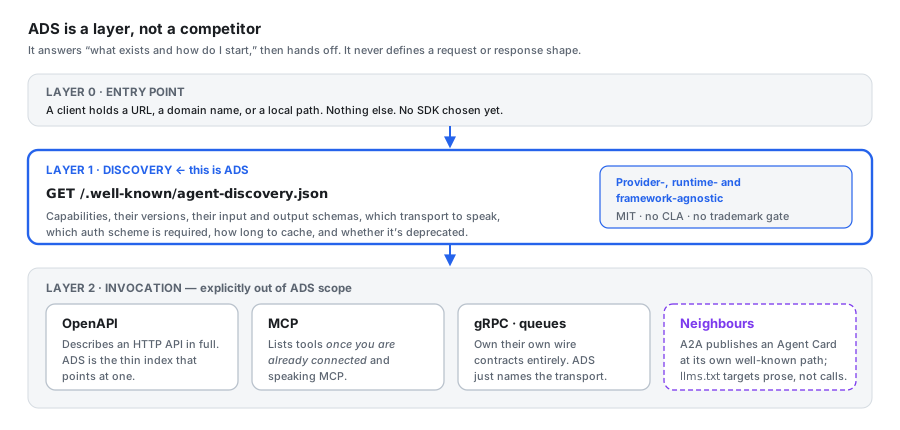
| What it does | When you can read it | |
|---|---|---|
| ADS | Lists what exists and where to find it | Before connecting to anything |
| MCP | A full protocol for an agent to use tools | After you've connected and are speaking MCP |
| OpenAPI | Describes a web API in complete detail | Wherever the file is published |
| A2A Agent Card | Describes an agent's identity and skills | Before connecting, at its own well-known path |
The clearest way to see it: an ADS manifest can point at an MCP server.
{
  "name": "com.example.escalateToHuman",
  "version": "1.0.0",
  "endpoint": {
    "transport": "mcp",
    "address": "mcp://support-escalation.internal.example.com",
    "auth": "mtls"
  }
}
That's not a competitor — that's a signpost. ADS gets you to the right door; MCP is the language you speak once you're inside.
Same with OpenAPI. OpenAPI describes a web API exhaustively: every route, every
parameter, every response code. ADS is the one-line index entry that says "this system
has a capability called lookupOrder, and here's the address." Different jobs.
The closest genuine neighbour is A2A's Agent Card, which also lives at a well-known path and also describes capabilities before you connect. The difference is framing: the Agent Card belongs to a specific agent-to-agent protocol, while ADS tries to stay protocol-neutral and describe anything — a single cloud function, a tool server, a whole fleet. Whether the world needs both is a genuinely open question, and a fair one to raise.
Try it yourself
Enough theory. Let's build a working example. This takes about ten minutes and needs only Python, which you almost certainly already have.
Step 1 — create a manifest
Make a folder and put the file where the spec expects it. That leading dot in
.well-known matters:
mkdir -p ads-demo/.well-known
cd ads-demo
Now create .well-known/agent-discovery.json:
{
  "specVersion": "0.1.0",
  "id": "com.example.campus-assistant",
  "name": "Campus Assistant",
  "description": "Looks up library books and room bookings.",
  "provider": {
    "name": "Example University",
    "url": "https://example.edu"
  },
  "capabilities": [
    {
      "name": "com.example.findBook",
      "version": "1.0.0",
      "description": "Search the library catalogue by title.",
      "inputSchema": {
        "type": "object",
        "properties": { "title": { "type": "string" } },
        "required": ["title"]
      },
      "endpoint": {
        "transport": "http",
        "address": "https://api.example.edu/v1/library/search",
        "auth": "none"
      }
    },
    {
      "name": "com.example.bookRoom",
      "version": "2.1.0",
      "description": "Reserve a study room.",
      "endpoint": {
        "transport": "grpc",
        "address": "grpc://rooms.example.edu:443",
        "auth": "oauth2"
      }
    }
  ],
  "discovery": { "cacheTtlSeconds": 3600 }
}
Note the second capability uses grpc — we'll use that in a moment to see the
skip-don't-fail rule in action.
Step 2 — serve it
python3 -m http.server 8000
Step 3 — fetch it, the way a client would
In another terminal:
curl http://localhost:8000/.well-known/agent-discovery.json
You just performed agent discovery. That's genuinely the whole mechanism — a plain GET request to a predictable path.
Step 4 — validate it against the real schema
This is where you find out whether your file is actually correct, instead of hoping.
pip install jsonschema requests
Save this as validate.py:
import json, requests
from jsonschema import Draft202012Validator

SCHEMA_URL = (
    "https://raw.githubusercontent.com/Cheela-Labs/"
    "agent-discovery-spec/main/spec/schema/manifest.schema.json"
)

schema = requests.get(SCHEMA_URL).json()
manifest = json.load(open(".well-known/agent-discovery.json"))

errors = sorted(Draft202012Validator(schema).iter_errors(manifest),
                key=lambda e: list(e.path))

if not errors:
    print("✅ Valid manifest")
else:
    for e in errors:
        location = " → ".join(str(p) for p in e.path) or "(root)"
        print(f"❌ {location}: {e.message}")
python3 validate.py
Now break it on purpose. Delete the "auth": "none" line from the first
capability and run it again. You'll get a clear complaint that auth is required —
which is exactly the safety net from earlier doing its job.
Put it back before moving on.
Step 5 — write a tiny client
This is the interesting part, because it's where the design decisions become real
code. Save as client.py:
import json, urllib.request

# Only what OUR client actually knows how to speak.
KNOWN_TRANSPORTS = {"http"}
KNOWN_AUTH = {"none", "apiKey"}
SUPPORTED_MAJOR = 0


def discover(origin):
    url = f"{origin}/.well-known/agent-discovery.json"
    try:
        with urllib.request.urlopen(url) as r:
            manifest = json.load(r)
    except urllib.error.HTTPError as e:
        if e.code == 404:
            print("This system doesn't support ADS. That's fine, not an error.")
            return None
        raise

    # Rule: an unreadable major version is a hard stop. Never guess.
    major = int(manifest["specVersion"].split(".")[0])
    if major > SUPPORTED_MAJOR:
        raise SystemExit(f"Can't read specVersion {manifest['specVersion']}")

    return manifest


def usable_capabilities(manifest):
    for cap in manifest["capabilities"]:
        transport = cap["endpoint"]["transport"]
        auth = cap["endpoint"]["auth"]

        # Rule: SKIP what we don't understand. Never reject the whole file.
        if transport not in KNOWN_TRANSPORTS:
            print(f"  ⏭  skipping {cap['name']} — can't speak '{transport}'")
            continue
        if auth not in KNOWN_AUTH:
            print(f"  ⏭  skipping {cap['name']} — can't do '{auth}' auth")
            continue

        if cap.get("deprecated"):
            print(f"  ⚠️  {cap['name']} is deprecated")

        yield cap


manifest = discover("http://localhost:8000")
if manifest:
    print(f"\nFound: {manifest['name']} — {manifest['description']}\n")
    print("Checking capabilities:")
    usable = list(usable_capabilities(manifest))
    print(f"\n✅ {len(usable)} capability/capabilities I can actually use:")
    for cap in usable:
        print(f"   • {cap['name']} v{cap['version']}")
        print(f"     → {cap['endpoint']['address']}")
python3 client.py
You should see something like:
Found: Campus Assistant — Looks up library books and room bookings.

Checking capabilities:
  ⏭  skipping com.example.bookRoom — can't speak 'grpc'

✅ 1 capability/capabilities I can actually use:
   • com.example.findBook v1.0.0
     → https://api.example.edu/v1/library/search
That's the whole thing working. Look at what happened: our client didn't understand gRPC, so it skipped that one capability and carried on happily with the rest. It didn't crash. It didn't reject the file.
If you'd written raise Exception("unknown transport") instead of continue, you'd
have a client that breaks the first time anyone adds a capability you don't support —
and according to the spec, that would be your bug, not theirs.
Making your first contribution
Open standards need outside readers more than almost anything else, because the people who wrote them can no longer see their own assumptions. ADS is small, young, and MIT-licensed — which makes it an unusually good first open-source contribution.
There are three ways in, and picking the right one matters more than what you're proposing.
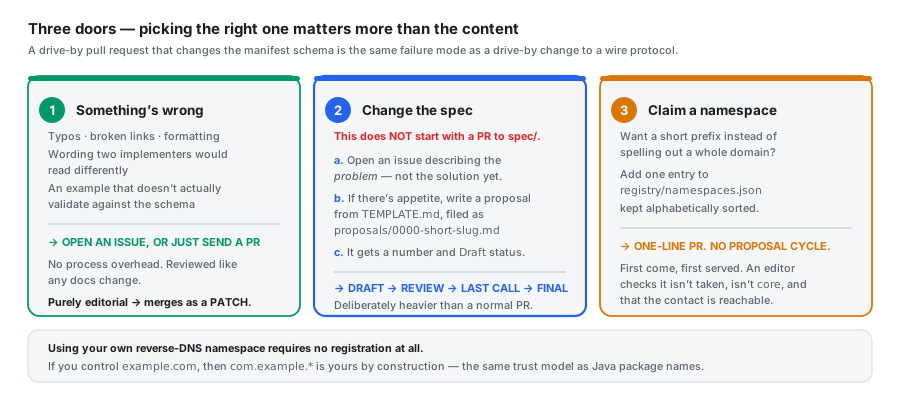
Door 1 — you spotted something wrong
Easiest, and genuinely valuable. Just open an issue or send a pull request. This covers:
- Typos, broken links, formatting
- Wording ambiguous enough that two people would read it differently
- An example that doesn't actually work
That middle one is the goldmine for a newcomer. You are in the best possible position to spot it, precisely because you're reading it fresh. If you had to read a paragraph three times, that's data. The person who wrote it can't feel that anymore.
The repo even has an issue template that asks: "If two implementers would read this differently, describe both readings." You don't need to know the fix. Naming the confusion is the contribution.
Door 2 — you want to change how it works
This one is heavier, deliberately. Do not start with a pull request to the spec/
folder. From the project's own contributing guide:
A drive-by PR that changes the manifest schema is the same failure mode as a drive-by PR to a wire protocol — it might be a great idea, but it needs to be proposed, discussed, and given a chance for implementers to object before it lands, not after.
The sequence:
- Open an issue describing the problem — not your solution. This is the step
people skip, and it's the most valuable one. It catches "someone tried that" and
"you can already do this with the
extensionsblock" before anyone writes code. - If there's interest, write a proposal from the repo's template, saved as
proposals/0000-your-idea.md. An editor assigns the real number when it merges. - It moves through four stages:
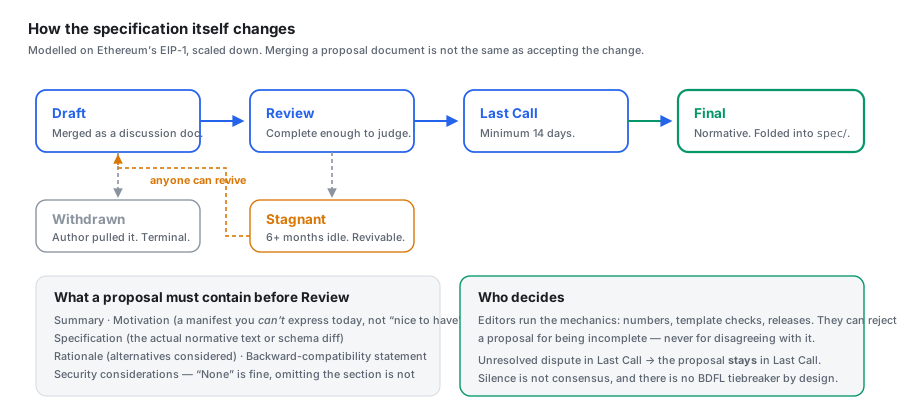
Draft → Review → Last Call → Final. Only Final proposals change the actual
spec. There's a mandatory 14-day window at Last Call so people who've built on the
standard get a real chance to object.
A proposal has to include a few specific sections, and two of the requirements are worth copying into your own habits:
- Motivation must be concrete. "This would be nice" is explicitly rejected. You need to show a real thing you cannot express today.
- You must fill in the security section. "None" is a fine answer. Leaving it out is not — because a missing section reads as "never thought about it."
Door 3 — claim a short name
The smallest door. Add one line to a JSON file:
{
  "prefix": "acme",
  "owner": "Acme Corp",
  "contact": "https://acme.example",
  "registeredDate": "2026-07-27"
}
First come, first served, no proposal needed. Note this is entirely optional — if
you own a domain, com.yourdomain.* is already yours with no registration at all.
A realistic first contribution
If you want somewhere concrete to start, here's the honest advice: read one spec document carefully and write down every sentence you had to read twice.
That's it. That list is a genuinely useful issue. It costs you an hour, requires no permission, and improves the document for everyone who comes after you — which is what a specification is actually for.
Things that could be improved
No standard arrives finished. Here are four real gaps I found while reading, written out so you can see what "reviewing a spec" actually looks like in practice. All four would make reasonable first contributions.
1. A regex that rejects real domains
The spec says namespaces work by reversing a domain you own. But the pattern it uses to check them requires every segment to start with a letter. Testing it against the real schema:
PASS  com.example.lookupOrder
PASS  cheela.runtime
FAIL  com.7-eleven.checkStock      ← segment starts with a digit
FAIL  com.example.foo_bar          ← underscore
Domains starting with a digit are completely legal — 7-eleven.com exists. So a
company that owns a perfectly valid domain can't express it, which contradicts the
whole "your domain is yours by construction" promise. By the spec's own rules,
loosening a pattern that wrongly rejected valid input is a small patch-level fix.
2. Signing is described but not pinned down
Manifests can optionally be signed, so you can verify one you received through something you don't fully trust. The spec says to sign the document with the signature field removed — sensible, since you can't sign something containing its own signature.
But it never says how to write the JSON out before signing. And that matters more than it sounds: two servers can produce the same logical data with different spacing, different key order, or different character escaping — and get completely different signatures for identical content.
There's already a standard for exactly this problem (RFC 8785). Pointing at it would close the gap.
3. Nothing stops duplicate capabilities
The schema happily allows two entries with the same name and the same version pointing at different addresses. Listing several different versions side by side is clearly intentional and useful. But two identical ones? A client told to "pick by name and version" has no rule for which to choose.
4. There's no test suite yet
This is the big one, and the highest-impact thing anyone could contribute right now.
There's no shared collection of example manifests — ones that should pass, ones that should fail — for implementers to check themselves against. Without that, two people can both believe they've implemented the spec correctly and still be incompatible.
Building that collection needs no special authority. It just needs someone patient.
FAQ
What is the Agent Discovery Specification, in one sentence? It's an open standard that lets any system publish a machine-readable "menu" of what it can do at a predictable web address, so AI agents can find out before connecting.
Where does the file go?
At https://yourdomain.com/.well-known/agent-discovery.json, served as JSON.
Do I need to be an AI company to use it? No. ADS describes any system an agent might call — a single cloud function, an internal API, a command-line tool. It says nothing about what's behind it.
Is it a replacement for MCP? No, they're complementary layers. MCP is a full protocol for using tools; ADS just helps you find things before you connect. An ADS manifest can point directly at an MCP server.
What happens if my client sees something it doesn't recognise? It should skip that one capability and carry on. Rejecting the whole file is explicitly considered a bug in your client, not in the manifest.
Do I have to register anything? No. If you own a domain, the matching namespace is automatically yours. There's an optional registry if you want a shorter prefix.
Is it ready for production use?
It's at version 0.1.0 and marked Draft, which means breaking changes are still
possible while it settles. Fine to experiment with and build against — just pin the
version you tested.
Who controls it? No single company gets special standing. It's MIT licensed, disputes default to not making the change, and there's deliberately no single person with final say.
I'm a student with no open-source experience. Can I actually help? Yes, and unusually so. Reading a specification carefully and reporting what confused you is a real contribution that requires no permission and no prior work — and it's something the authors genuinely cannot do for themselves.
Wrapping up
The idea underneath all of this is small enough to fit in a sentence: put a menu at a predictable address, and agree on what a menu looks like.
What makes it interesting is the discipline around that idea. Refusing to also define how you call things. Making tolerance of the unfamiliar a hard requirement instead of a suggestion. Splitting three version numbers apart so no number ever has to mean two things. Forcing "no authentication" to be something a person writes down deliberately.
Those are all decisions someone made by anticipating a specific way things go wrong later. Whether or not ADS is the standard that wins, that pattern of thinking is worth stealing for anything you build.
And it's young enough that a careful reader can genuinely improve it in an afternoon.
Where to go next:
- 🔬 Agent Discovery Spec: a
.well-knownfor AI agents — the technical deep dive: the full manifest schema field by field, how ADS compares to MCP and OpenAPI, and the design arguments behind each decision - 📖 The specification — six short documents, meant to be read in order
- 🧪 Working examples — a minimal one and a full one, both verified valid
- 🤝 Contributing guide — which door to use